Best Website Platform for Wedding Businesses: WordPress vs Wix vs Squarespace vs Showit
by Brian Lawrence
Which Website Platform is Best for Wedding Businesses?
Choosing the right website platform can feel overwhelming. You want something that looks beautiful, works reliably, and helps you attract more wedding couples. Every platform has strengths and weaknesses, and the right choice depends on your priorities, your technical comfort, and your long-term growth plans. If you want that decision made as part of a broader wedding industry website design strategy rather than in isolation, that’s exactly the kind of work we do.
Today, I’m comparing WordPress, Wix, Squarespace, and Showit. I’ll walk through what each one does well, where they struggle, and how they stack up for wedding photographers, planners, venues, DJs, florists, and other wedding pros.
Quick Summary
Before we dive into the details, here is a quick snapshot:
- WordPress is the most flexible and powerful, but also the most complex.
- Wix is the most beginner-friendly with drag-and-drop ease.
- Squarespace gives stunning design templates and all-in-one simplicity.
- Showit is ideal for visual storytellers who want pixel-perfect design control.
WordPress: Best for Ranking, Scaling, and Long-Term Control
If your primary goal is to rank on Google, build authority over time, and create a website that grows with your business, WordPress is usually the strongest option.
Choose WordPress if your main goal is:
- ranking for competitive keywords like “New Jersey wedding DJ” or “Connecticut wedding planner”
- publishing blogs that attract organic traffic month after month
- customizing SEO details at a deep level
- scaling your site over time without hitting platform limits
WordPress shines when visibility matters. If your business depends on being found in search results, especially locally, WordPress gives you the most control over how your site is structured, optimized, and expanded.
Technical comfort check:
WordPress works best if you are comfortable with:
- managing hosting
- installing and updating plugins
- learning how themes and page builders work
You do not need to know how to code, but you do need patience and a willingness to learn or outsource support.
Pros
1. Total Customization
You can design exactly what you want. No boundaries. Full control of your layout, your pages, your features.
2. Huge Plugin Ecosystem
Need a booking system? A fancy gallery? Advanced SEO tools? There is a plugin for almost everything.
3. Scales with Your Business
Whether you start with a few pages or grow into a full online shop or membership site, WordPress can handle it.
4. SEO Power
You can optimize nearly every aspect of your site with plugins like Yoast or Rank Math. This helps you show up in Google searches.
5. Cost Flexible
You can keep monthly costs low with inexpensive hosting. Then upgrade as you grow.
Cons
1. Learning Curve
WordPress is not super hard, but it is more complex than Wix or Squarespace. There are more decisions to make.
2. Maintenance Required
You must update WordPress regularly, along with themes and plugins. If you do not, your site can become slow or insecure.
3. Potential for Plugin Conflicts
Sometimes plugins can clash with each other. This means you’ll need help troubleshooting.
4. Hosting Separate
You must purchase hosting. That means another account, another login, another bill. For some people, this feels like extra work.
Wix: Best for Speed, Simplicity, and Getting Online Fast
If your primary goal is to launch quickly with minimal learning and minimal stress, Wix is designed for exactly that.
Choose Wix if your main goal is:
- getting a professional site live as soon as possible
- editing visually without worrying about structure or code
- managing everything in one dashboard
- keeping technical tasks to a minimum
Wix works well when your website is more of a digital storefront than a long-term SEO engine.
Technical comfort check:
Wix is ideal if you:
- want drag and drop editing
- prefer not to deal with hosting or updates
- want a guided setup experience
This is one of the most beginner-friendly platforms available.
Pros
1. Easiest to Use
Wix is built for people who want simple visual editing with no coding.
2. Quick Setup
You can launch a beautiful site in a day, if not a few hours.
3. All-in-One
Hosting, design, security, and updates are all handled for you.
4. Built-In Features
Wix has built-in tools for bookings, forms, and galleries with no need to install plugins.
5. Affordable
Plans are clear, and you know what you get each month.
Cons
1. Less Flexible Design
You are limited to what Wix allows in its editor. Custom design options can feel constrained.
2. SEO Limitations
Wix has improved SEO tools, but they are not as powerful or flexible as WordPress.
3. Hard to Switch Platforms
Once your Wix site grows, it can be harder to migrate to another platform.
4. Template Lock-In
After you choose a template, you cannot change it without rebuilding pages.
Squarespace: Best for Polished Design and All-in-One Balance
If your primary goal is a beautiful, cohesive website that feels premium without heavy customization, Squarespace sits right in the middle.
Choose Squarespace if your main goal is:
- presenting a clean, elevated brand
- using professionally designed templates
- managing content, blogs, and galleries in one system
- avoiding plugin overload or technical maintenance
Squarespace is about balance. You give up some flexibility in exchange for consistency and ease.
Technical comfort check:
Squarespace is great if you:
- want structure without complexity
- are comfortable learning a specific editor
- prefer built-in tools over third-party add-ons
It takes a little time to learn, but once it clicks, it is very manageable.
Pros
1. Gorgeous Templates
Squarespace designs are modern, elegant, and tailored for visual businesses like wedding photographers and planners.
2. All-in-One Platform
Hosting, updates, security, and features are all included.
3. Powerful Built-In Tools
You get blogging, galleries, forms, and eCommerce without plugins.
4. Solid SEO Tools
Squarespace gives you clear control over page titles, meta descriptions, and site structure.
5. Strong Support
Squarespace support is responsive and helpful.
Cons
1. Less Flexible than WordPress
Design flexibility is better than Wix for some elements, but not as deep as WordPress or Showit.
2. Slight Learning Curve
Squarespace is easy once you get it, but it still has its own system to learn.
3. Costs Add Up
Squarespace pricing can be a little higher, and some features are only on higher tiers.
4. Not Ideal for Extreme Customization
If you want truly unique layouts outside of their design system, it can be tricky.
Showit: Best for Pixel-Perfect Design and Creative Control
If your primary goal is design freedom, storytelling, and complete visual control, Showit is hard to beat.
Choose Showit if your main goal is:
- creating a truly custom, brand-forward design
- controlling every element’s placement
- designing desktop and mobile layouts separately
- standing out visually in a crowded wedding market
Showit is for people who care deeply about how their site looks and feels.
Technical comfort check:
Showit works best if you:
- are comfortable making design decisions
- enjoy visual editing
- are willing to think about layout and spacing
You do not need coding skills, but design confidence helps a lot.
Pros
1. Total Visual Freedom
You place elements anywhere. This is ideal for designers who want a unique layout.
2. Mobile Customization
You can design desktop and mobile layouts separately so each looks perfect.
3. Built for Creatives
Showit attracts users who want their brand to stand out with a custom design.
4. Backed by WordPress Blogging
If you use Showit with a connected WordPress blog, you get the best of both worlds. The blog runs on WordPress, and the main site runs on Showit.
5. Great Support
Showit has a supportive community and helpful customer service.
Cons
1. Slightly Higher Cost
Showit pricing is usually higher than Wix or Squarespace.
2. Not Ideal for Standard E-Commerce
For online stores bigger than basic selling, Showit itself is not the best. You might need Shopify Lite or another system.
3. Learning Curve for Design Newbies
Because you can place elements anywhere, people with no design experience can feel overwhelmed.
4. Blogging Requires WordPress
If you want a full blog, you need to connect with WordPress, meaning two systems to manage. This is optional but worth knowing.
How Each Platform Handles Key Wedding Business Needs
Now, look at some specific wedding business features:
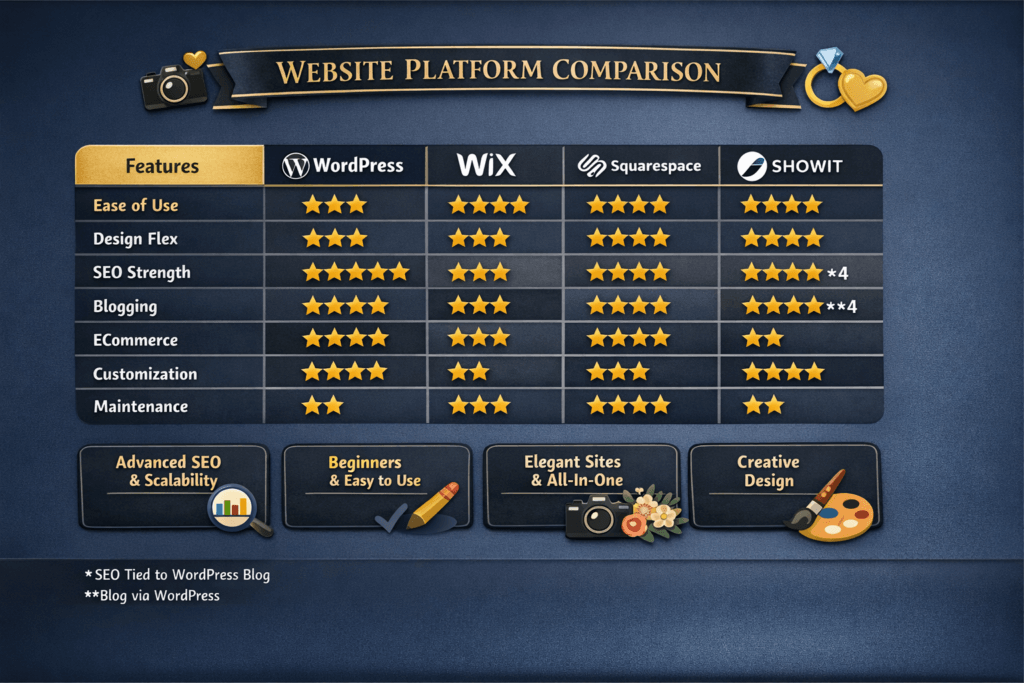
SEO and Search Visibility
- WordPress wins for deep SEO control. You can customize everything and install powerful SEO plugins.
- Squarespace has solid SEO built in and handles basics well.
- Wix improved its SEO tools and can work fine for local searches.
- Showit, when paired with WordPress for blogs, can be strong. But Showit alone has limited SEO structures.
Blogging
- WordPress is the best blogging platform of all.
- Squarespace has the second-best blogging tools, featuring elegant layouts.
- Wix blogging is workable, but not as deep as the other two.
- Showit relies on WordPress for the blog, which is a good combo for SEO and design.
Design and Branding
- Showit gives the most design freedom.
- Squarespace gives the most polished templates with minimal effort.
- WordPress can be gorgeous, but it requires a theme choice and sometimes a page builder.
- Wix is flexible but can look generic if not carefully designed.
ECommerce
- WordPress with WooCommerce is the most powerful overall.
- Squarespace is simple and good for small shops.
- Wix can sell products and services easily.
- Showit is not focused on eCommerce; you will need extra systems.
Support and Maintenance
- Squarespace and Wix handle most maintenance for you.
- Showit has strong support, but you handle design choices.
- WordPress gives you freedom at a cost of maintenance responsibility.
Choosing a website platform is not about trends or what everyone else is using. It is about what supports your goals, your workflow, and how couples actually interact with you online.
Choose the Right Platform for Your Needs
If you want help choosing the right platform, structuring your pages for search visibility, or turning your website into a tool that brings in qualified wedding inquiries, I can help. My NJ website design for wedding businesses combines platform strategy with industry-specific SEO, so your site is built to attract couples from the start. Schedule your free consultation, and let’s make sure your website platform is the right one.