How to Connect Instagram to Google Search Console (A Wedding Pro’s Walkthrough)
A couple searched Google last Tuesday for a wedding professional, landed on your Instagram, scrolled through about forty seconds of your work, and left without sending a message. You have no record that visit ever happened. Your Instagram analytics will tell you how many people the app showed a post to, how many saved it, and roughly where in the country they live. They will not tell you that somebody arrived from a Google search, and they will never tell you what that person typed to find you. That path has been invisible for as long as you have been in business. There has been a real amount of booking traffic walking down it.
Google changed that in July, and almost nobody in the wedding industry has noticed yet.
Here is the picture to hold onto for the rest of this post. Your website is your front lobby, and you have had a visitor counter on that front door for years. The counter is Google Search Console, a free Google tool that reports what people searched right before they clicked through to you. Your Instagram is a side entrance to the very same business. Couples have been walking through it the whole time, and nobody was counting. Google will now hand you a counter for the side door too, and installing it takes about a minute.
What a platform property actually is
Until this summer, Search Console understood two things: a website you owned, or one section of a website you owned. Either way, you had to prove the site was yours by adding a record with your web host or pasting a small piece of code into the site.
A platform property is a third kind, and it is built for accounts instead of websites. You connect a social or video account, and you prove it is yours by signing into that account through a Google permission screen. Once Google accepts it, that account reports like any other property: clicks, impressions (the number of times you appeared in results, whether or not anyone clicked), click-through rate, average position, and the actual searches sitting behind all of it.
The feature went live on July 7, 2026, and finished reaching every account by the end of that month. If you have logged into Search Console since then and never opened the property dropdown, it has been sitting there waiting.
One point to be clear about, because a few write-ups have muddled it. This is a private dashboard for you and nobody else. It does not push your posts anywhere. It does not make anything rank higher, and it is a separate product from the public Search profiles Google launched in June. Connecting one does not create the other.
Which platforms are supported, and the gap you should plan around
Four accounts are eligible: Instagram, TikTok, X/Twitter, and YouTube. Facebook, LinkedIn, Pinterest, and Snapchat are not, and Google has not said whether they are coming.
That list has a real hole in it for wedding businesses. Pinterest is where a lot of couples do their earliest looking, months before they contact anybody. Plenty of venues and photographers see more discovery from it than from anything else they run. Facebook still holds the local wedding groups and the mother-of-the-bride audience. Neither one reports here.
So set the expectation now, with yourself and with anyone you send reports to. This gives you a clear view of part of your social footprint, and a genuinely useful part. Build a quarterly review around it as though it covered everything, and you will be explaining the missing pieces later.
How to connect Instagram to Google Search Console
Before you start, sign in to the Instagram account you want to connect, in the same browser you are about to use. The whole process runs through a normal Instagram login, so having the right profile already signed in saves you a detour halfway through.
- Open Google Search Console and sign in. Use the Google account you want to own this reporting long term. If your website is already in Search Console, use that same Google login so everything sits in one place.
- Open the property selector in the top left, then click Add property. You can also go straight to the Search Console welcome screen and start there.
- Look at the list carefully. Above the divider, you will see the familiar option for adding a website. Below it, under a heading marked New, you will find Instagram, TikTok, X, and YouTube, each with an Add button next to it.
- Click Add next to Instagram. Google shows a permission screen explaining that it needs to link the account to your Google account to confirm you own it, and that it may see your basic profile information. Read it, then click Agree and continue.
- Sign in and authorize. If you run several profiles on the same platform, one for the business and one for a second brand or a client, slow down right here and confirm you are on the correct one. This is the easiest step in the whole process to get wrong, and untangling it afterward is more annoying than doing it right the first time.
- Click Go to property once you see the confirmation.
That is the entire job. No file to upload, no code to paste, nothing to hand off to whoever built your website.
Then you wait. A brand new property shows empty charts and a note telling you to check back within 48 hours, and in practice it can take a few days before the numbers say anything useful. Here is the part that should get you doing this today rather than in October: your charts will only ever cover the stretch of time since you connected. The counter starts counting the day you plug it in, and there is no going back to count last spring.
Every account is its own property, so a venue running Instagram, TikTok, and YouTube goes through this three times. Two Instagram accounts are two properties. There is no combined view, so comparing them means exporting each one and putting them side by side yourself.
Screenshot Clips of the Process:

GSC Property Dropdown in upper left

GSC menu dropdown to add a new property
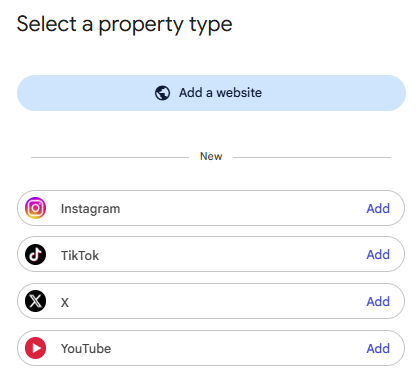
Select the social media property you wish to connect to your Google Search Console account
What you get once the data lands
Three reports show up, and the sidebar strips down to just those.
Performance is the one you will actually live in. Total clicks, impressions, average click-through rate, and average position, and you can filter all of it by individual post and by search term. Discover and Google News sections appear only if your content picks up traffic from those places.
Insights gives you a higher-level read on recent traffic, your best-performing content, and how people are finding the account on Google. One quirk is worth knowing so it does not send you hunting for a problem that is not there. The summary card at the top counts clicks across all of Google, including image, video, and news results, while the lists underneath cover web search only. The lists will not add up to the summary number, and that is expected.
Achievements tracks milestones, such as passing a click threshold over 28 days. Pleasant to see. Not something you will decide from.
Performance and Insights both open on a 28-day window, which you will want to widen once you have some history built up.
Two counting details are specific to social and worth filing away. An Instagram Story that surfaces in Google results counts as an impression, and counts as a click when somebody taps through. And when one of your videos appears in results and gets opened inside Google’s own player instead of on the platform, that still counts as a click here. Both cases are spelled out in Google’s help documentation, which is worth a look if your numbers ever seem off.

Sample overall performance of Instagram account in GSC
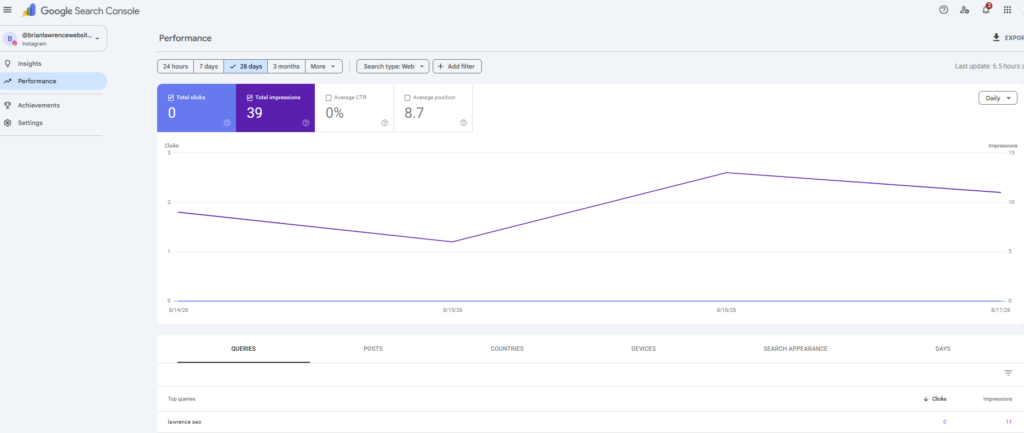
Sample Instagram performance in GSC
What the search terms are worth to a wedding business
The clicks number is the least interesting thing on that screen. The search terms are where the value sits, and after three or four weeks you will have enough of them to read.
Start with one question: are couples finding you by name, or by need? If nearly every search is some version of your business name, Google is treating your profile as a destination for people who already knew you existed. That is a picture of your reputation, and it may be a good one, but it is not discovery. If you are picking up searches like a venue name, or a city paired with a service, or a particular style of wedding, then your social content is doing real discovery work, and you should be feeding it more of whatever produced that.
Look at venue names next, and look hard. For DJs, photographers, planners, and officiants, a venue name is often the highest-intent search a couple makes all year, because they have already booked the room and now they need everybody else. If a real wedding post tagged at a specific venue is surfacing in Google for that venue’s name, you have just found the content format that brings you the most qualified couples, and you have probably been producing it by accident. Start producing it on purpose.
Then find the searches where a Reel is beating your own website. This one stings a little. If a thirty-second Reel is picking up clicks for a search your service page has been chasing for two years, that is information about the page, not a compliment to the Reel.
And widen that date range as soon as you have the history to widen it. Wedding demand is not flat across the year, and a 28-day window will hide the shape of your season from you completely.
One more thing, and it runs against instinct: connect the account even if you have not posted to it in a year. Older Instagram posts and YouTube videos keep pulling search traffic long after you have stopped thinking about them, so an account you had written off may still be earning inquiries you have never counted.
Where this fits with AI search
Every new Google feature gets an AI story attached to it right now, so let me be direct about this one. Platform properties measure Google Search, Discover, and News. They do not measure whether ChatGPT, Perplexity, or Google’s AI answers are recommending you, and nobody should sell this to you as an AI visibility tool.
The real connection is more useful than the invented one. AI systems build their picture of your business out of everything the web says about you, and your social profiles are a large piece of that picture. Search Console data showing which of your profiles Google surfaces, and for which terms, is the first hard evidence you have ever had about how Google connects those accounts to your business name. That connection is the raw material the AI systems draw from. Measuring it is not the same as improving it, and you cannot do the second without the first.
The practical work does not change, and it pays in both directions. Write your business name, your service area, and your description the same way on your website, in your Google Business Profile, and on every social profile you run. Side door and front door should describe the same company in the same words.
Keeping the counter plugged in
Google re-checks ownership from time to time. If the login you authorized expires, the property pauses until you verify again.
This one is going to catch wedding pros more than most, because so many of you have a social manager, a family member, or an assistant working in the account, and Instagram access often runs through a Meta Business Suite login that changes the moment staffing changes. Put a recurring reminder on your calendar to open Search Console once a quarter and confirm every property is still connected.
The good news is that re-verifying does not cost you anything. Your history is still sitting there. You are not starting the count over.
Which account to connect first
Connect Instagram today. That is the one call I would make if you do nothing else this week. It carries the most wedding industry activity by a wide margin, and of the four platforms. It is the most likely to surface for venue and vendor searches, which are the searches that turn into bookings.
Add YouTube next if you have published anything there at all, because video results have their own real estate in Google, and even a modest channel picks up clicks nobody has been counting. TikTok is worth doing if you post consistently rather than occasionally. X goes last, and only if you are genuinely active there, which most wedding businesses are not.
Each one takes about a minute, so connecting an account you are unsure about costs you close to nothing. Waiting costs you a gap in your history that you cannot go back and fill.
Remember: the counter only counts from the day you plug it in. Connecting your Instagram this afternoon is worth more than a perfect reporting plan next quarter.
Frequently asked questions
Do I need a website to connect Instagram to Google Search Console? No. Platform properties were built partly for creators and brands who publish on social and never built a site. If you do have a website, the platform property sits alongside your existing website property and does not change it in any way.
Will connecting my Instagram help my website rank better? No. This is a reporting tool. Google has not documented it as a ranking factor in either direction, so connecting or skipping it does not affect how your site performs in search.
Can I add Facebook or Pinterest to Google Search Console? Not currently. Google supports Instagram, TikTok, X, and YouTube, and has not announced plans for Facebook, LinkedIn, Pinterest, or Snapchat.
Why are my Search Console charts empty after connecting? New properties take a few days to collect and process data, and you will see a message telling you to check back within 48 hours. Your charts only cover the period since you connected, so a new property has nothing to show yet.
Does this show me how many people saw my post on Instagram? No. It reports only on how your content performed on Google. Your in-app reach, views, and engagement still live in Instagram’s own analytics.
I manage accounts for several businesses. Can I see them all in one view? Not in one view. Each account is a separate property, so comparing them means exporting each one and combining the data yourself.
Is a platform property the same as a Google Search profile? No. A Search profile is a public page on Google that gathers a creator’s content together and has follower thresholds attached to it. A platform property is a private analytics dashboard. Creating one does not create the other.
The short version
Connect your Instagram this afternoon, connect your YouTube if you have one, and look again in a week. Once you have a month of search terms, the useful question is not how many clicks you got. It is whether couples are finding your social content because they already know your name, or because they are searching for what you do. Those two answers point you toward very different next moves.
If you want a hand reading the data once it comes in, or you would rather have one search strategy running across your website, your Google Business Profile, and your social profiles instead of three that do not talk to each other, I am glad to look at it with you. Grab a time here: calendly.com/briandavidlawrence